House Rules
Fixed writing rules for your campaign texts: brand name, forbidden phrases, word limit and hashtags, set once and followed by the planner and the writer of your campaigns.
Updated Oct 29, 2026
House rules are fixed writing rules that you set once: how your brand name is written, phrases that must never appear, a maximum number of words and which hashtags may be used. The planner and the writer of your campaigns follow them every time, so you do not have to repeat them in every briefing.
House rules need campaigns in your subscription. Without them there is no House rules section in Settings, and when you ask the assistant for a rule it tells you that house rules only steer campaign texts and stores nothing.
What You Can Set
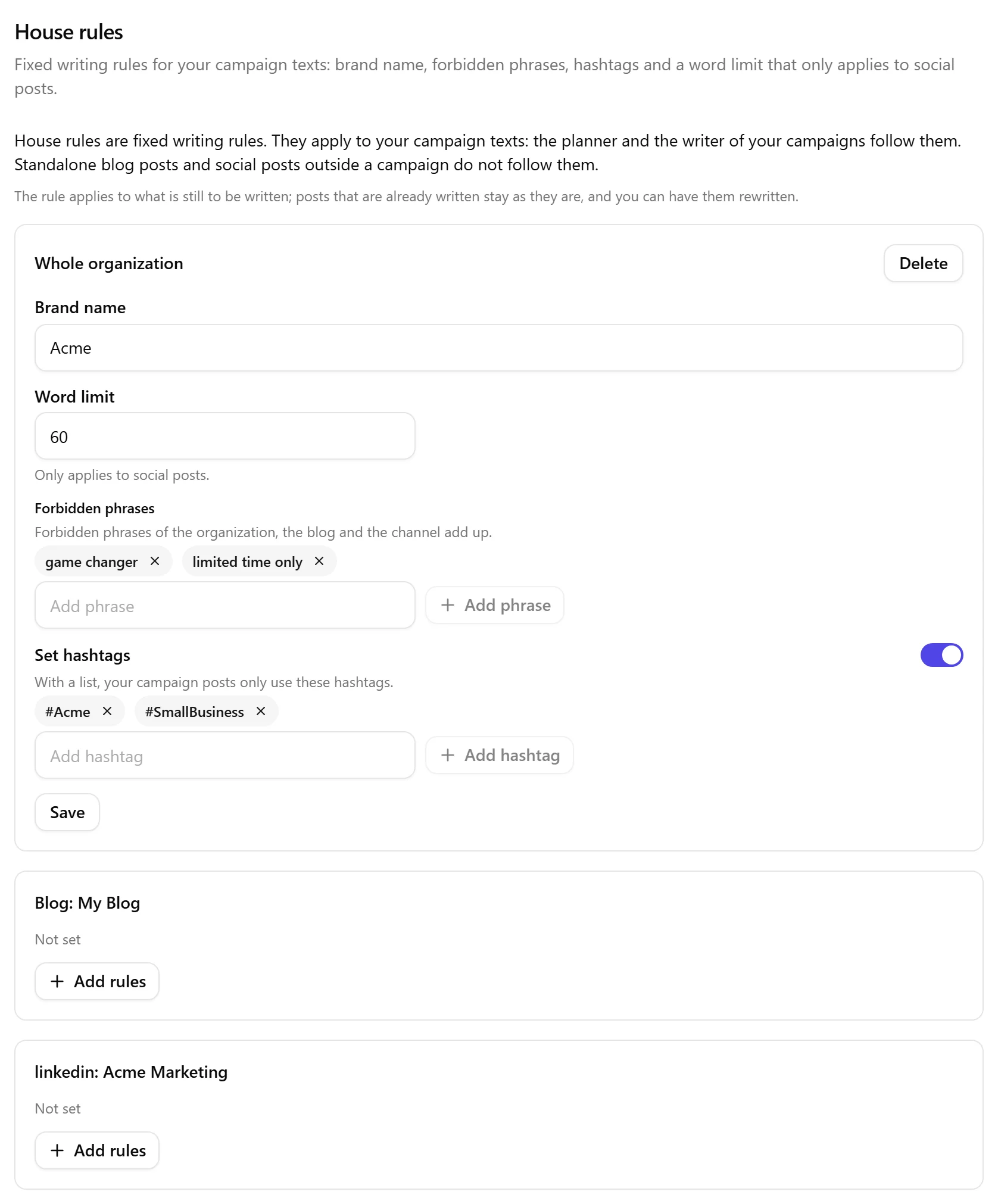
Each rule is one of these four, and you can set them separately:
- Brand name. How your brand name is always written.
- Forbidden phrases. Phrases your campaign texts never use. The forbidden phrases of the organization, the blog and the channel add up.
- Word limit. A maximum number of words. It only applies to social posts; blog posts do not follow it.
- Hashtags. A list means "only these hashtags": your campaign posts use hashtags from that list and no others. To use no hashtags at all, turn on Set hashtags and leave the list empty (the card then says Use no hashtags).
A rule belongs to one level: the whole organization, one blog, or one connected social channel (an account, so two accounts on the same platform can have different rules). When more than one level sets the same thing, the most specific level wins: a channel goes before a blog, and a blog before the organization. Forbidden phrases are the exception, they add up.
A language is not a house rule. A campaign post follows the language of its channel in the campaign; if you want a post in another language, ask for it to be rewritten.
Where the Rules Apply
House rules apply to your campaign texts: the planner and the writer of your campaigns follow them. Standalone blog posts and social posts outside a campaign do not follow them.
If you set a rule while you are working on a standalone post, it is saved, and the assistant tells you that it applies to your campaign texts and not to this post. What you can do on that post: change the words yourself, or add the post to a campaign.
A rule applies to what is still to be written. Posts that are already written stay as they are, and you can have them rewritten.
Setting Them in Settings
Open Settings and choose House rules in the Content Creation group (or search for it). Each level has its own card: the whole organization, each blog, and each connected channel. A channel that is no longer connected shows as Channel no longer connected; its rule does nothing anymore and can only be deleted.
Press Add rules on a level, fill in the fields and press Save. Delete asks for confirmation and then removes all rules of that level; campaign texts then follow the rules of the level above.
Only an admin or an editor can change house rules; a Contributor sees them read-only. If someone else changed the rules at the same moment, you see "Someone else just changed these rules. We now show what is stored; apply your change again." Nothing is overwritten silently.
Setting Them with the Assistant
Ask the assistant for the rule in your own words, for example that a phrase must never be used or that social posts stay under 80 words. It shows a card, Set a house rule, with the change and the level it applies to. Nothing is stored until you press Set rule; Do not set drops it.
When the rule could go to more than one place, for example you have two accounts on the same platform, or no blog is chosen so it could be the whole organization or one blog, you choose on the card. Nothing is preselected and Set rule stays off until you have chosen. All accounts applies it to every account of that platform.
Afterwards the card shows what is stored. If only part of it was confirmed, it says so and sends you to Settings under House rules to check.
If you type "yes" instead of pressing the button, the assistant stores nothing: it points you to the button on the card itself. Before you press Set rule, it also does not say that the rule is already stored.
Removing a Rule or Allowing a Phrase Again
The assistant does not delete house rules. To remove a forbidden phrase or a hashtag, press Remove next to it in Settings under House rules; to remove all rules of a level, use Delete. To stop using hashtags, turn on Set hashtags and leave the list empty.
Ask the assistant to remove a house rule and it does not delete anything; it tells you where to do it. A house rule is removed in Settings under House rules. A rule in the guidelines of a campaign is removed on the campaign page, under Guidelines. If campaigns are not part of your subscription, it tells you that house rules belong to the campaign feature.
This holds on every screen. Even on the dashboard, with more than one blog, the assistant tells you where to remove a house rule and does not ask which blog it is for.
On the campaign page you can ask the assistant to rewrite posts that are already written. If you ask for all posts, it first asks which posts you mean and lists them for you to confirm. Answer with a plain yes (for example "yes" or "yes please") and it shows the rewrite card for exactly those posts, for you to review; nothing changes before you click. If you name the posts (or select them), it shows a rewrite card for you to check.
A Rule for One Campaign
A rule that is only meant for one campaign is not a house rule. It goes into the guidelines of that campaign, and the assistant adds it to the guidelines that are already there instead of replacing them. If the guidelines are full, the assistant says so and asks you to shorten them first. See Communication Campaigns and The Content Advisor.
Related articles
Was this article helpful?
Still need help?
Can't find what you're looking for? Open your support portal for live chat and tickets. Sign in with your Nolorem account.
Open support portal