Communication Campaigns
Turn a goal into a coordinated plan of blog and social posts, scheduled for you. A Premium feature built around what Nolorem can honestly measure.
Updated Sep 23, 2026
Communication campaigns turn a goal into a coordinated plan of blog and social posts, scheduled for you. You name the campaign and set its goal, the AI proposes a dated content plan across your blog and connected social channels, you review and adjust it, and Nolorem generates and schedules everything.
Campaigns are a Premium capability. They are entirely organic: the plan is about what to publish, when, and on which channels.
How It Fits Together
A strategy is the standing context for one blog, which Nolorem treats as one brand: your objectives, brand voice, and content pillars, plus the audiences you keep under Settings > Company. It is mostly filled in from your blog settings, so you confirm it rather than build it from scratch. One strategy is active per blog at a time, and you can see every earlier version, switch back to one, and delete an old one you no longer want. The version that is currently active can never be deleted.
A campaign runs under that strategy for a set period. Each campaign has a goal, a period, a cadence, and the dated plan of blog and social items it produces.
Starting a Campaign
- Open the Campaigns page from the sidebar (it follows your active blog).
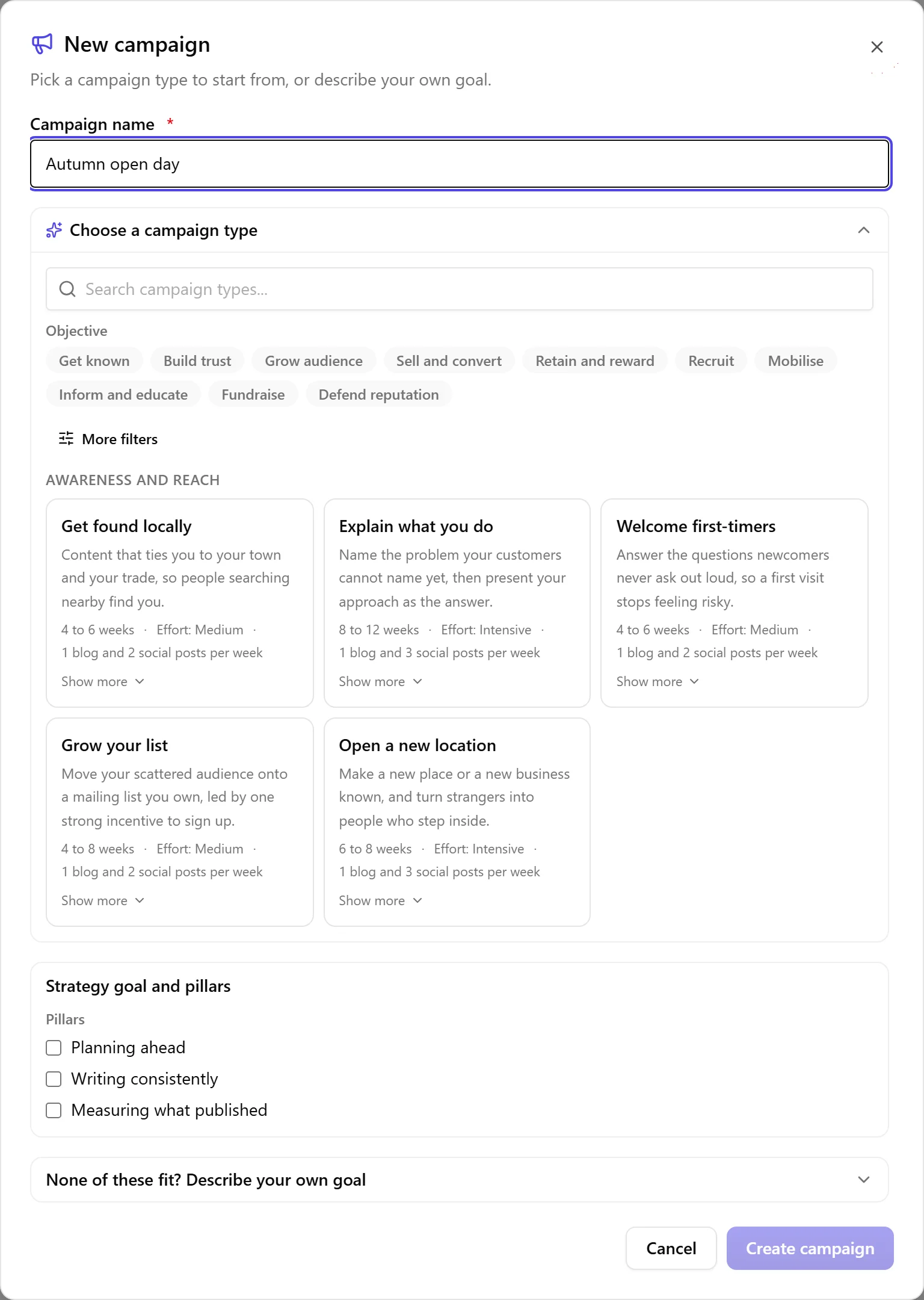
- Click New campaign and give it a name.
- Pick a campaign type from the library of 36 researched types, grouped by what they are for: getting known, building authority, converting, retaining, community, and moments. Each card tells you what it commits you to before you choose it: how long it runs, how much effort it takes, and how many blog and social posts per week. If none of them fit, open Describe your own goal and write one instead. A campaign type and your own goal are alternatives, so typing your own clears the type you had picked.
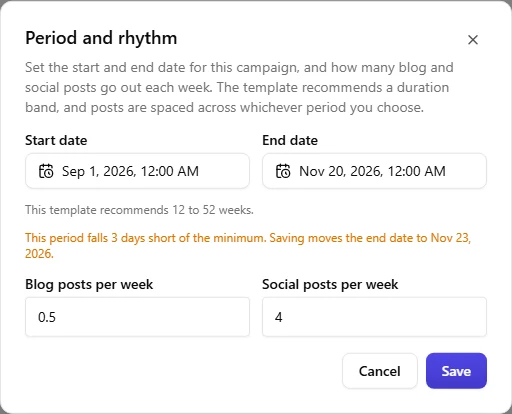
- Set the period. The type proposes a sensible start and end, and the calendar shows you its recommended range. Dates well short of the type's minimum are not selectable, but the last three days before that minimum are: pick one of those and Nolorem tells you, before you save, that the end date will move out far enough to reach the minimum. Dates beyond the recommended range stay available but are marked so you can see you are stretching it.
- You land on the campaign page and the AI Assistant opens automatically, already knowing your blog's audiences and voice, and which campaign type you chose. Confirm that context, and if you have several audiences, tell it which one this campaign is for.
- The assistant proposes the audience, channels and cadence, and explains why. Apply its proposal, then generate the plan.
- Choose a strategy goal and, optionally, one or more pillars from your blog's strategy for this campaign to serve, alongside its own goal. If the strategy has no goals or pillars of its own yet, the campaign says so and points you to the strategy first, since there is nothing to choose from.
When you pick a campaign type, its card also proposes a rhythm, how many blog and social posts a week, matching its own research. You can change either number right there before generating anything, and whatever you set is what the plan is built to deliver. Under the rhythm fields, a line updates as you type: "That is about 6 blog posts over this period", so you see the real total before you save rather than having to multiply it out yourself.
If you name a new audience in the chat, or add one from a campaign's briefing (below), Nolorem adds it to that same list under Settings and the campaign selects it. Adding an audience takes an admin or an editor; a contributor picks from the audiences that are already on the list.
If you close the wizard partway through, by accident or on purpose, what you typed is not lost: reopen New campaign on the same blog and your name, template or goal, and dates are still there. Only pressing Cancel, or finishing the campaign, clears it. Once you ask for a plan, building it takes a few seconds for a short campaign; a longer one can take a few minutes, and a very long, multi-month campaign several. Feel free to leave the tab open and check back.
How Many Posts a Campaign Can Promise
A campaign does not carry a limit of its own. Its blog and social posts spend from the same monthly allowances your account already has, compared month by month across the campaign's whole period. If the period and cadence you set would need more blog or social posts this month than you have left, creating the campaign, or later widening its period or cadence, is refused rather than saved. The message names which side is short, how many posts it needs and how many are actually free for that month, so you know exactly what to lower. "Free" means what is left after the posts you already published that month and after what your other live campaigns have promised for it, and it counts what THIS campaign already delivered as already paid for, so a campaign that kept its promise is never refused on it. Renaming a campaign, or changing its colour, never runs this check; changing the period or the cadence always does. On a campaign whose plan is already generated, the check weighs what the change will actually produce, the real rhythm the posts end up following, rather than a plain multiplication of the new dates by the old numbers, so lengthening a period on its own is never refused for asking for more than it does, and shortening one is judged on the pace it genuinely creates, spread across every calendar month the shortened period touches rather than only the month the posts happen to land in. See "Changing the Period of a Campaign That Is Already Running" below.
Nolorem plans a campaign of at most about 54 weeks at a time. Set a period longer than that and nothing is refused: the campaign is created and its plan covers the first 54 weeks, with a line under the rhythm fields saying so plainly instead of quietly falling short. Once that first stretch is running, you can have a new plan made for the time after it. This is a limit on how far ahead one plan reaches today, not on how long a campaign itself may run.
Why a Campaign Type Has a Minimum Length
Each type carries a duration its research supports, and the two ends behave differently on purpose.
Just short of the minimum, Nolorem gives you the days instead of the refusal. A period that falls up to three days short is saved, with the end date moved out to reach the minimum. You are told this twice: the period editor says which date it will move to while you are still deciding, and the confirmation after saving names the date that was actually stored. Nothing else about the campaign is touched. Your start date, your cadence and your channels stay exactly as you set them.
Further below the minimum, Nolorem still declines, and tells you why in the type's own terms rather than as a validation error. A behaviour-change campaign asks for at least six weeks because changing what people do needs repetition: awareness, then the real obstacle, then a social norm, then a demonstration, and only then the ask. Two weeks does not do that badly, it does not do it at all. Three days is a rounding difference on a six-week campaign, and four weeks is a different campaign, which is why the give stops where it does.
Above the maximum, Nolorem saves the campaign and warns you. A campaign that runs too long is a weaker campaign, not an impossible one, so the choice stays yours.
The AI Assistant follows the same rule, including the give. Ask it to shorten a campaign to a day or two under its minimum and it applies the change with the end date moved, and its confirmation names the end date that was really stored rather than the one it proposed. Ask it for something well below the minimum and it declines and offers you the shortest version that does work, rather than quietly building the one that will not.
Once a campaign has left draft, changing its period needs permission to publish. Moving the dates under posts that already have a place on the calendar is a publishing decision, not an editing one, so contributors can set and change the period of a draft while editors and admins can change it afterwards. And when such a change is one of those that moves the end date out to the minimum, Nolorem asks you to confirm first, and tells you how many scheduled posts sit inside the period you are about to move.
An Objective That Names Where It Came From
You can set a campaign up by talking to the Content Advisor instead of filling the form in yourself, and if the goal comes out of a document you uploaded, the objective it proposes carries that document with it: the file it read, and the sentence it took the objective from.
Both are on the card before you apply anything, so you can see what the proposal rests on rather than trusting it. Apply it and they stay on the campaign, with the document name as a link to its row in the media library.
The quote is checked before it is stored. Nolorem looks for that sentence in the document it claims to come from. If it is not there, the objective is still saved but its source is dropped, so an attribution you read is one that survived the check rather than one the AI asserted. Where a document is too vague to yield an objective, the advisor says so and asks you what the campaign should achieve, instead of inventing a goal and hanging a document on it.
Delete the document afterwards and the objective keeps its quote, with a line saying it came from a document that is no longer in your library. What you decided stays legible even when the file behind it is gone.
Which Channels a Campaign Uses
A campaign type knows what kind of channel it needs, not which brand name. Thought leadership asks for a professional network, a visual launch asks for a visual channel, and so on. Nolorem matches that to what you actually have connected, so the same type lands on the same kind of channel every time instead of being scattered differently on every run.
That means a channel attached to a campaign is not always used, and Nolorem tells you when that happens:
- If nothing you have connected fits the type, the plan is blog only and says so.
- If the preferred kind of channel is missing, it names which kind it wanted and which channel it used instead.
- If a channel is attached to the campaign but does not suit this campaign type, it says no posts will go there.
That last one you can overrule, and it sticks. The notice carries a button that takes the channel into this campaign anyway. Press it and three things happen at once: the choice is recorded on the campaign itself, every social post already in the plan gets that channel, and the notice changes to say how many posts in this plan go there. Ask for a new plan afterwards and the channel is still used. That is the part that used to fail quietly: a channel you set by hand on individual cards disappeared on the next regeneration without a word.
Nothing changes unless you press the button, so a campaign type's own channel choice stays the default. You can only take in a channel that is really connected and really attached to this campaign, and if the plan comes back with no posts on it anyway, the notice says that too rather than leaving you to count.

Taking a Channel Back Out
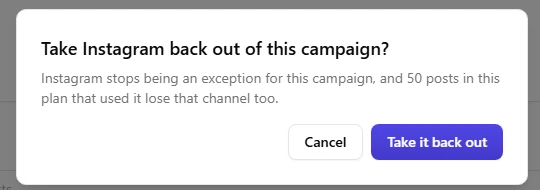
Change your mind after taking a channel in, and the same notice carries a second button, Take it back out. It asks you to confirm first, naming how many posts in the plan will lose that channel, and once you confirm, both the exception and those posts' use of the channel are gone. Take the channel in again afterwards and everything works exactly as it did the first time; the two buttons are a genuine switch, not a one-way door.
The assistant will only name channels you really have. It will not promise a platform you have not connected, and for a platform Nolorem does not support at all, such as TikTok or YouTube, it says so plainly instead of sending you looking for a page to connect it on.
Who Can Do What
Campaign work follows the same roles as the rest of your workspace.
- Contributors treat a campaign like an ordinary post: they create campaigns, edit them, set the period and cadence while the campaign is still a draft, and generate the plan and its content. They cannot approve a post for publication, move the period of a campaign that has already left draft, pause or cancel a campaign, delete one, change the communication strategy, or add a new audience to the list under Settings > Company. They pick from the audiences that are already there.
- Editors and admins can do all of it.
Controls a role cannot use are hidden rather than shown greyed out, so nobody clicks something that will only refuse.
Reading a Campaign's Card
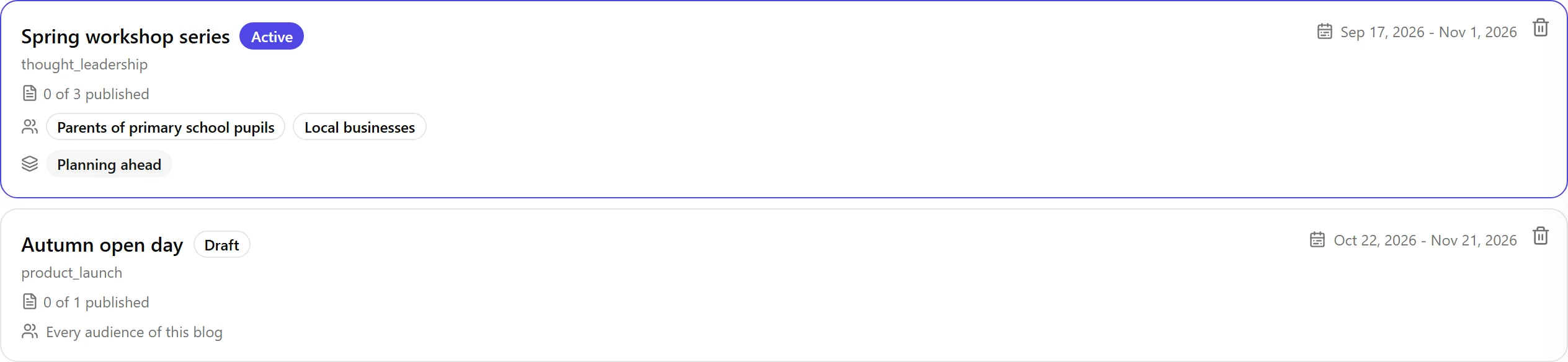
Each campaign on the list shows N of M published: how many of its posts are actually live right now, against the total number of posts the campaign has. A social post only counts as published once every one of its channel posts is live; one that failed does not count against it. This is not the number of posts that have been generated, only the number that have actually gone out, so a campaign whose plan just finished generating can genuinely read "0 of 12 published" for a while, right up until the first scheduled post goes live.
Under the counter, small labels show which audiences the campaign targets, or Every audience of this blog if you have not narrowed it down. If the campaign is also tied to one or more pillars from your blog's strategy, those show as a second row underneath, only when there are any. Both rows are read-only here; change them from the campaign's briefing (below).
Editing a Campaign's Briefing
The pencil at the top right of the campaign card opens one dialog with four tabs: Goals, Audiences, Strategy, and Period and rhythm. All four are saved together with one Save button.
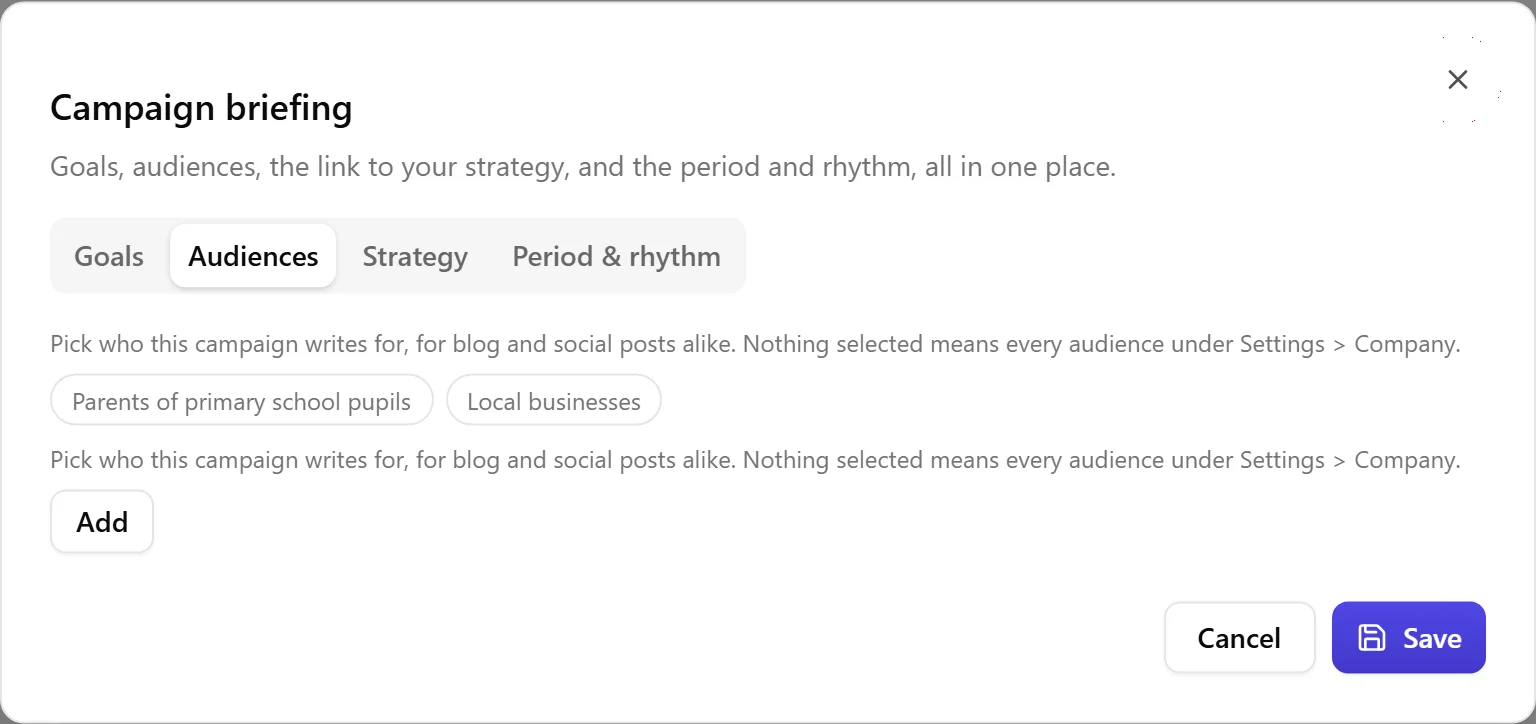
- Goals are the campaign's own objectives. A goal that came from a document you uploaded keeps that source with it, exactly as before.
- Audiences are picked from the pool you keep under Settings > Company; an admin or editor can add a new one right here without leaving the dialog. Your selection steers BOTH the blog and the social posts this campaign generates. Nothing selected means all of them, and the list holds at most 10.
- Strategy links the campaign to one strategy goal and any pillars you choose, in addition to the campaign's own goals. If the strategy has no goals or pillars yet, this tab points you to the strategy first. Rename a goal or pillar in the strategy and every campaign linked to it keeps the link; remove one from the strategy and it disappears from every campaign that had chosen it.
- Period and rhythm is the same period and cadence editor described above.
While the campaign is generating its posts, the briefing cannot be saved; try again once generation finishes.
Changing the Period of a Campaign That Is Already Running
Moving the dates in the Period and rhythm tab does not always do the same thing. What happens depends on how far the campaign has already come.
On a draft, saving a changed period or cadence rebuilds the plan. The Save button itself says so, reading "Save and generate the plan again", with a reminder just above it that anything you edited on individual cards by hand is lost when that happens. Saving a period or cadence that has not actually changed, or saving any of the other three tabs, stays an ordinary save that touches nothing else.
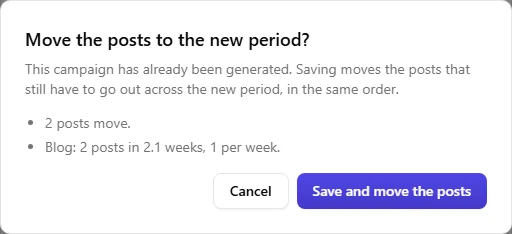
On a campaign whose plan is already generated, Nolorem moves the posts that have not gone out yet, instead of leaving them where they were. Before anything moves, a confirmation tells you exactly what will happen:
- how many posts move, and to what rhythm (for example "Social: 10 posts in 4.4 weeks. Once saved, the cadence will read 2.18 per week (planned: 1.63)."), followed by a line saying which way the pace goes compared with the pace before the change, shortening a period raises it and extending it lowers it, and neither is refused for that reason alone;
- how many stay exactly where they are because they are already published or on their way out;
- how many stay because they are already scheduled on your own website's calendar (a blog post you had told to publish at a set time keeps that time, quite apart from the campaign);
- how many stay because their date has already passed, or they failed, retrying a failed post is still its own action on that one post;
- and a blog post and its promotion posts always move as a unit; a promotion post never lands ahead of the blog post it promotes, even if that blog post itself falls into one of the groups above.
Confirm, and Nolorem carries it out; the message afterward names how many posts actually moved. The rhythm on this tab is read-only once a campaign has a generated plan, for the same reason the confirmation states the rhythm rather than asking for it: it shows what your posts are really doing, not a number that no longer drives anything. Setting the rhythm yourself only matters while you are creating the campaign or while it is still a draft, see "Starting a Campaign" above.
Shortening a period can still be refused on your monthly limit, the same allowance described in "How Many Posts a Campaign Can Promise" above, weighed against the rhythm the shortened period would actually produce, spread evenly across every calendar month the period touches rather than only the month the posts happen to land in. Extending a period never adds a single post, so it never asks more of that allowance.
Asking the AI Assistant to change the period or rhythm of a running campaign does exactly the same thing, with the same confirmation before anything moves.
On a paused campaign, a new period moves the paused posts too, using the same rules. If you resume later and the schedule Nolorem would restore no longer fits before the new end date, Nolorem does not cut posts off past the end: it spreads what is left across the time that remains, and tells you so, both before you resume (naming the date it no longer fits) and after (naming how many posts were spread and to what end date).
On a completed or cancelled campaign, nothing is left to move, so changing the period only changes the period; Nolorem tells you that up front instead of pretending something will shift.
Reviewing the Plan
The campaign detail page shows the proposed plan as a dated list of lightweight cards: date, channel, title and hook, summary, and the content pillar. You can adjust it two ways:
- Conversationally, by asking the assistant to change things.
- Directly, by editing a card's title, changing its date or channels, or removing it. The list always stays sorted by date, so moving a card is a matter of changing its date.
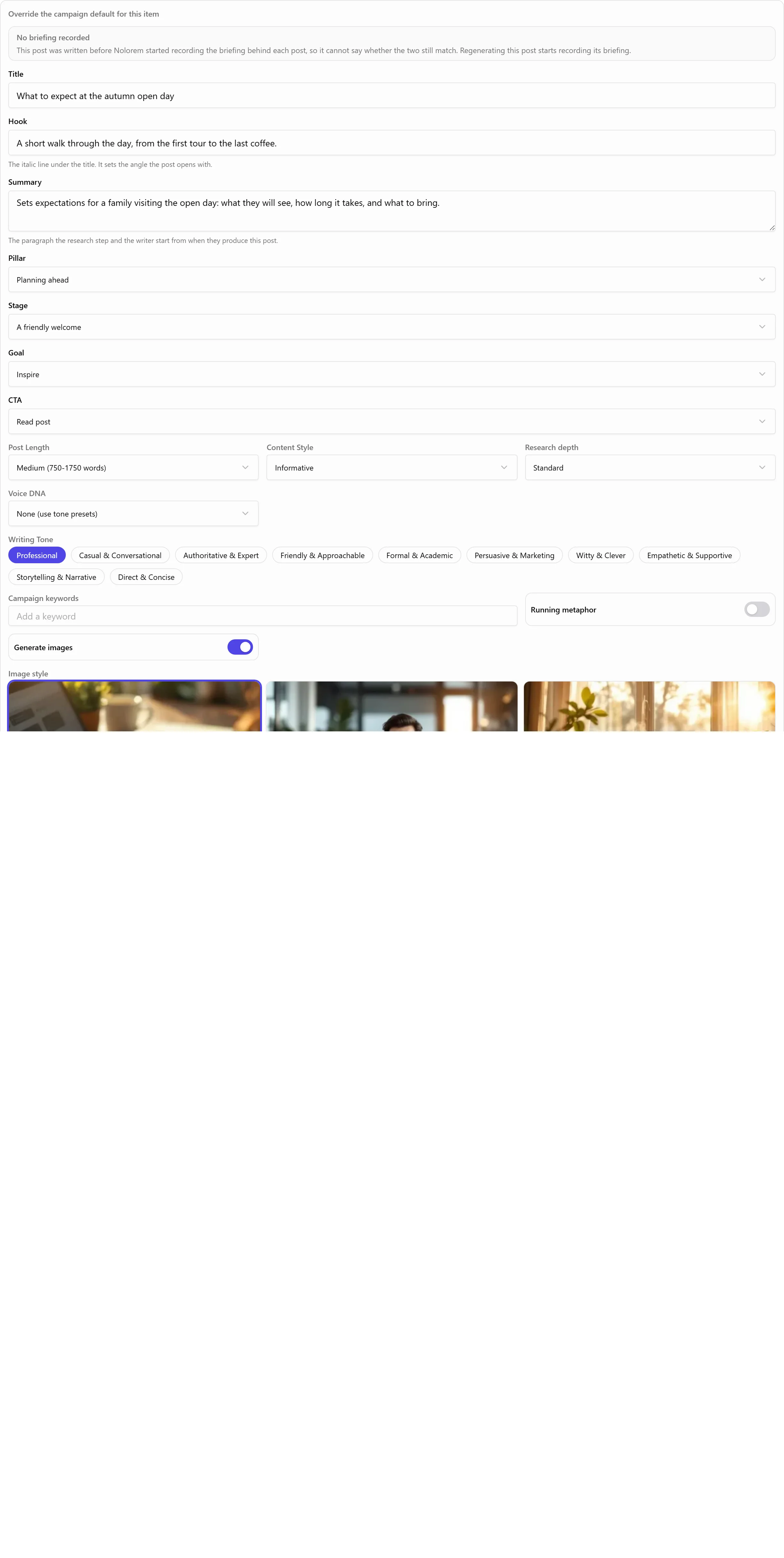
A card's pencil opens more than its title. It also opens the brief that tells Nolorem what the post is about: its one-line hook, the paragraph that summarizes it, which pillar of your strategy it serves, its stage in the campaign's arc, its goal, and its call to action. The pillar is chosen from your blog's strategy; the stage and the call to action can also be your own words. Goal and call to action are drawn from a list you manage per blog, see "Choosing Your Own Goals and CTAs" below.
Nothing is generated in full yet. These are skeletons. Once you confirm, the plan locks while generation runs.
How Many Times You Can Generate a Plan
Building or rebuilding a plan is its own monthly allowance, separate from your blog and social post counts: 30 times a month on Premium, 5 times a month during your trial. Every attempt counts, including one that fails, because the work behind it is already spent by the time you see the result. When you reach the limit, the message tells you how many you have used and when the count resets, and you can still edit the existing plan, generate its posts, and work in your other campaigns while you wait.
A campaign can also only have one plan generation running at a time. If you, or the AI Assistant on your behalf, ask for a new plan while one is already under way, the second request is turned down with a message telling you to wait for the first one to finish.
When a New Plan Has Fewer Posts Than You Already Have
Regenerating or adjusting a plan sometimes comes back with fewer blog or social posts than the plan already has, for example because you shortened the period or narrowed a request to the assistant. When that happens, Nolorem does not overwrite what you have. It asks first, showing exactly how many blog and social posts you have now against how many the new plan would leave you with, and gives you two ways forward: Keep what is there, which discards the new proposal at no extra cost, or Replace anyway, which saves it without generating it a second time.
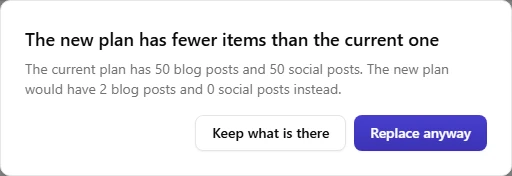
Choosing Replace anyway can also update your rhythm setting, only downward, and only when you asked for it. If the plan you kept genuinely holds fewer posts than your rhythm asks for, most often because you told the assistant to cut back, Nolorem updates the rhythm in your campaign's settings to match what the plan actually delivers, and shows a calm, informative line saying so: "You originally asked for 3 blog posts per week. Because this plan contains fewer, we updated the frequency in your settings to 2 per week. You can always change that back yourself." This is not a warning, and it never raises a rhythm you set yourself, only lowers it to match a plan you chose to keep. The total under the rhythm field, described above, moves with it right away.
If the Plan Could Not Be Generated
Occasionally the AI behind the plan cannot answer at all, most often because it is unavailable or refuses the request. Rather than a generic error, Nolorem tells you in plain language which of a handful of causes it was, together with how many parts of the plan it asked for and how many it actually got back before this happened. Nothing is saved when this happens, so the plan you already had stays exactly as it was, but the attempt does count towards your monthly plan generations, for the same reason as above: the parts that did answer have already been paid for. The message tells you whether trying again is likely to help or whether it is worth contacting support instead. The one exception is a failure that happens before the AI is asked anything at all, which is rare and says so in its own words; that one costs you nothing and does not count.
When the Plan Drifts Away from the Campaign
A plan does not follow the campaign around. Change the period, the cadence, the audience selection, a goal, or the strategy link after a plan exists, and the plan on screen still describes the campaign you had before. Nolorem now says so instead of leaving you to spot it: an amber notice above the plan names the reason, with the numbers in it. It compares what the plan was generated for against what the campaign says now.
The notice carries one of three headings, and each says only what is actually true. If the plan simply does not cover the campaign's rhythm well enough (it holds fewer posts per week than the cadence asks for, or the last item stops well before the period ends), the heading reads "This plan does not yet fully cover the campaign", never a claim that something changed, because in that case nothing necessarily did. If the period was moved since the plan was made, the heading reads "This plan was made for a different period". If the audience, a goal, or the strategy link changed, each gets its own line under the heading "The briefing has changed since this plan was made", opened by a label (Audience(s), Goal(s), Strategy goal, Strategy pillars) and followed by what was added or removed since the plan. When more than one of these is true at once, the coverage heading takes priority, then the period, then the briefing, because a plan that does not cover the rhythm is the one fact that never depends on what else changed.
On a draft campaign that notice carries a Generate a new plan button, which asks you to confirm first, because a new plan replaces the one on screen. Once the real posts exist the button is gone and only the reason stays: regenerating at that point would throw away work that has already been written. Dates are read in your workspace's own time zone, so the notice does not quietly vanish in the evening on the last day of the period, which is exactly when you would still want it.

Keep this plan sits next to that notice on EVERY campaign status, draft or already running. Press it and Nolorem confirms first: the existing titles and hooks stay exactly as written, and only the items still to be written pick up the new briefing automatically. Nothing is generated when you press it. It needs permission to edit and a Premium subscription. When a goal or pillar the plan was made for is removed from the strategy, the notice says so once; if that leaves the campaign without a pillar, it adds that the campaign now follows every pillar. Keep this plan clears that line like any other.
What the Plan Card Tells You After a Generation
Below the plan itself, up to three quiet lines report what Nolorem noticed the last time it generated or regenerated this plan, each only appearing when it applies:
- A leftover item that closely resembles another one. Nolorem checks a fresh plan for items that say close to the same thing (in any of the platform's seven languages) and asks for a different one where it finds a match, up to a couple of tries; a line here means one still slipped through, with a nudge to adjust it by hand or generate the plan again.
- Fewer items than the rhythm asked for, when the last generation could not fill every place after its own retries.
- That the resemblance check itself could not run this time, most often a brief technical hiccup, so you know the absence of the first line above is not a clean bill of health.
This line and the coverage heading above cover the same ground from two angles, so when the amber notice already shows the coverage heading, this card keeps quiet about the shortfall rather than repeating the same number twice; the resemblance lines are unrelated to coverage and always show when they apply.
The honest limit. On a very long or very frequent campaign, Nolorem may run out of time within one request to fully resolve every leftover resemblance, and the card says so rather than staying silent about it. Nolorem does not stop working on this quietly; a plan that stops short here still names what it stopped short of.
What the Adjust Field Answers
Type an instruction into the Adjust field and Nolorem counts what happened afterwards, then tells you in a short block under the field:
- how many blog and social posts the plan holds now, and how many it held before,
- which channel went from how many posts to how many,
- which channel is attached to this campaign but could not be used whatever you asked for, with a pointer to the notice just below where you can take it in,
- how many posts kept their own custom settings (tone, image style, and the like) through the change, and how many lost them and now use the campaign default, when that happened,
- and, when nothing moved at all, that nothing moved.
Every number there is counted from the plan itself. None of it is the AI reporting on its own work, which is why it can tell you that your instruction was not carried out. The last line is the one that changes the most: an instruction the model quietly ignored used to look exactly like a slow one.
Nolorem only carries a post's own settings across an adjustment when it can recognize the same post afterwards, by its date and title. A full regeneration always starts every post clean, since there is no earlier plan left to recognize anything from.

Choosing Your Own Goals and CTAs
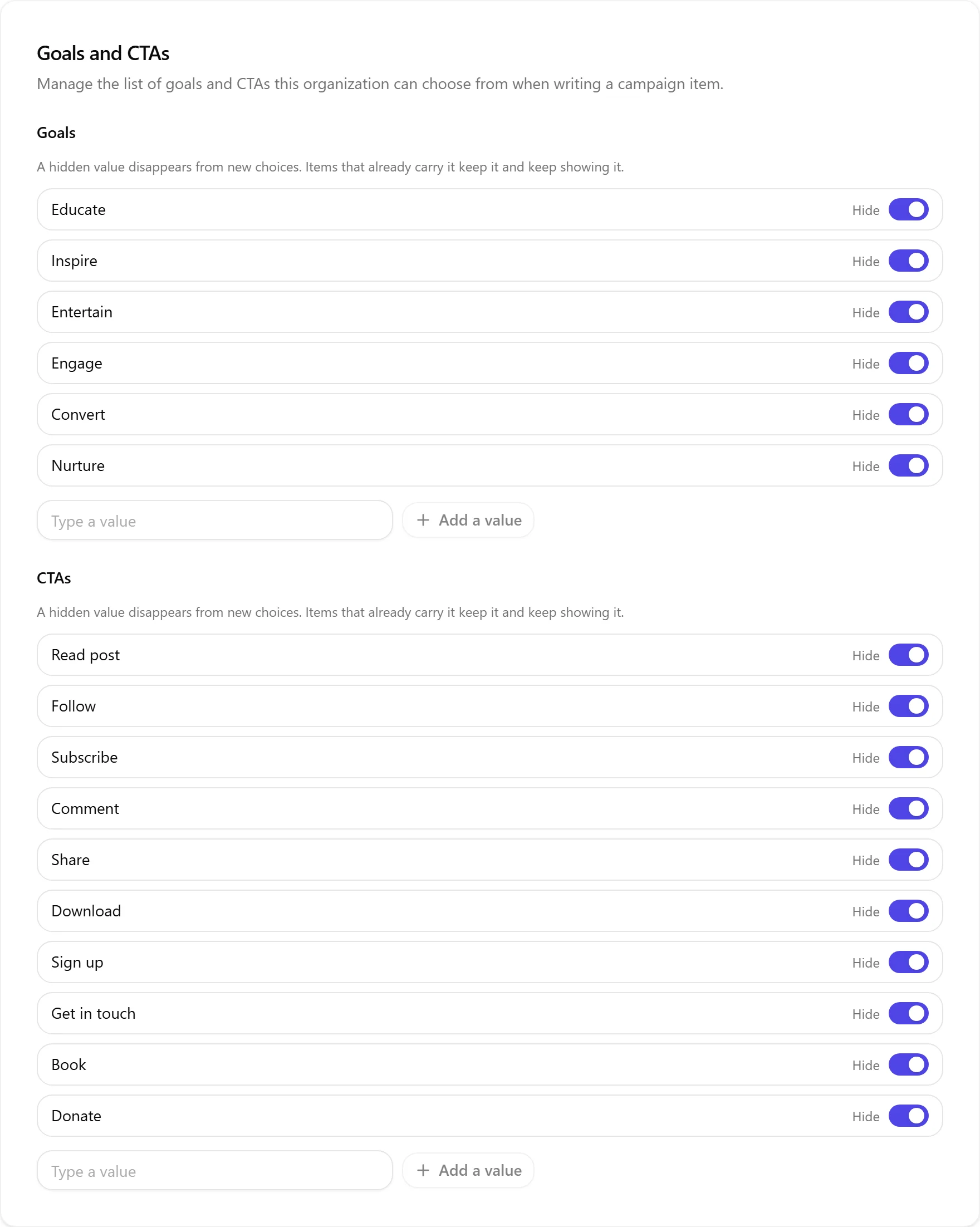
A post's goal and call to action are not free text: they come from a list you manage per blog, under Settings > Goals and CTAs. Nolorem ships six goals (Educate, Inspire, Entertain, Engage, Convert, Nurture) and ten calls to action (Read post, Follow, Subscribe, Comment, Share, Download, Sign up, Get in touch, Book, Donate). You can add your own words to either list, and hide any built-in one you never use. Hiding a value only removes it from new choices; a post that already carries it keeps it and keeps showing it, on its own card and everywhere else that post appears. Managing the list takes an admin or an editor; a contributor picks from whatever is already there, the same rule that governs the audience list under Settings > Company.
The Confirm Gate
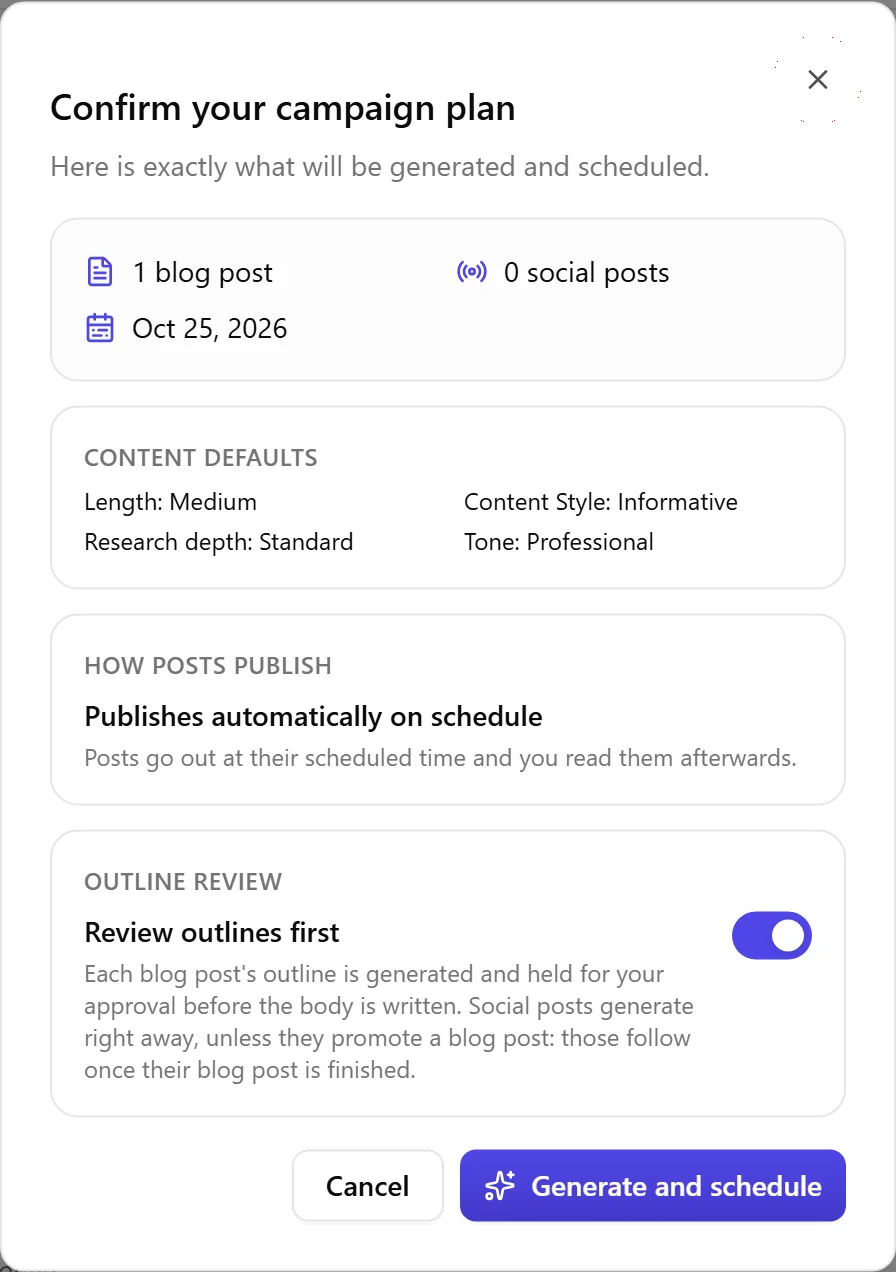
When you are happy, choose Confirm and generate. A confirmation step shows exactly what will happen: how many blog and social posts, the date range, and how many of your monthly blog credits it will use.
The confirmation also names how the campaign will publish, and that follows from who created it rather than from a choice you make here: a campaign made by someone with publishing rights publishes automatically on schedule, and you read the posts afterwards; a campaign made by someone without publishing rights holds every post for approval. Someone without publishing rights sees a note that publishing is not part of their role, instead of a control that would refuse them.
A teammate with publishing rights can switch a waiting campaign to publish automatically, once, from the campaign page, never back. Posts that are already waiting for approval when that happens keep waiting: switching the mode does not release them, and you still release them individually or with Approve all in the posts table below.
Generation and Progress
After you confirm, generation runs in the background and you stay on the campaign page. A progress bar and a per-item list show each post moving from queued to generating to done. If a post fails, Nolorem retries it automatically a couple of times; if it still fails, that one item shows Retry, Edit, and Skip, and the rest of the campaign keeps going.
Generated posts are linked to the campaign and appear on your calendar, where a colored campaign chip lets you show or hide just that campaign's posts.
Running a Live Campaign
From the campaign page you can:
- Pause the whole campaign. Nothing scheduled publishes while it is paused. Posts still waiting for your approval, and any that failed, are left exactly as they are: pausing never quietly resolves a decision that is still yours to make.
- Resume by picking a new start date. The remaining unpublished, already-scheduled posts shift forward together, keeping their spacing and weekday alignment and skipping weekends. Nothing that already published is touched, and a post waiting for approval or sitting on a failure is unaffected by the shift. If that shift would push posts past the campaign's own end date, Nolorem spreads them across what remains instead, and says so before and after, see "Changing the Period of a Campaign That Is Already Running" above.
- Cancel the rest, which removes the not-yet-published posts and leaves the published ones in place.
- Edit, reschedule, or remove any individual post that has not published yet.
Reading Posts Before You Approve Them
In hold-for-review mode the posts table is where you read and release the campaign's work. When a campaign has both blog and social posts, a filter above the table lets you narrow it to Blog or Social; leaving it on All shows every row.
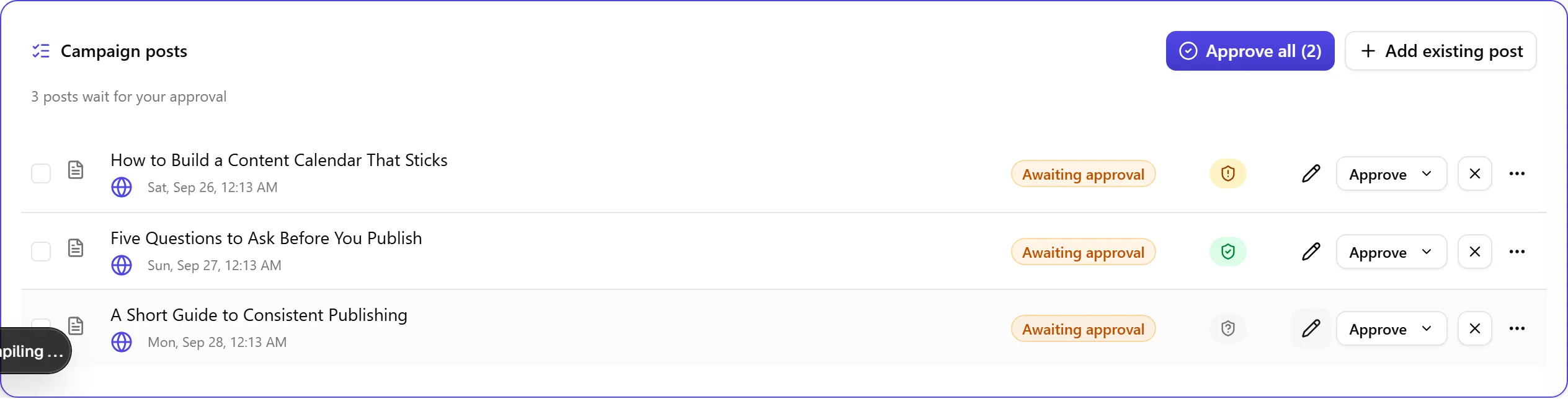
One row is one post. A social plan item that goes to LinkedIn and Bluesky is two rows, each naming its platform and the account it will use, each showing its own status, each with its own Open button to the editor. Approving one leaves the other where it is. That matters because those two posts are not the same text, and until now the table showed a single row for both, with one status and one button.
The title opens a preview, not a summary. A blog post shows up with its headings, its lists and its links intact, with the featured image above the text and the rest below it. A social post shows the copy for each platform with that platform's own images beside it. It is the post itself, not the published page with your site's own styling, so treat the layout as an approximation and the content as exact. Everything remains editable in the post's own editor.
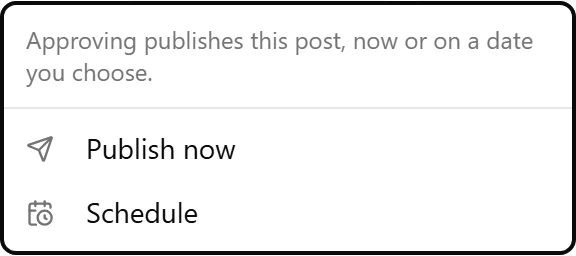
A waiting post carries the same Approve control as your regular posts list, with a menu and an X beside it. Approve opens Publish now or Schedule, for a date and time you choose; X sends the post back to a draft. A post the source check is holding names that in the same menu instead, with a link to open it in the editor and resolve it there, never a way to publish it from this table. A post whose campaign has been paused, cancelled or completed says so in the same menu too, and points you at resuming the campaign rather than offering a way around it.
Every blog row also carries a source check sign, the same one your regular posts list shows. Red means the check found something no source supports, green means it has been checked with nothing open, and a grey dash means it has not been checked. A social row carries no sign, since the source check does not run on social posts. Resolving a finding always happens in the editor; the sign here only tells you where things stand.
A post that failed to publish tells you why, and gives you a way out on its own row. The error is shown in full, with a link to your channel settings when a disconnected channel caused it. From the row's own retry menu you can publish it now, or, for a social post whose scheduled date is still ahead, try again on that date; a social post can also be deleted from the same menu, and a blog post through the campaign's own item menu.
Approving several at once works from the tick boxes and the button above the table, labelled Approve all or Approve selected with the exact count it will move. It skips a post the source check is holding and says how many it left behind, because that one is yours to decide post by post. A draft is a draft: a post you attached without submitting it for review, or one you sent back with X, waits for you to resubmit it, not for anyone's approval here.
Measuring Results, Honestly
The campaign report is built around what Nolorem can actually measure, and it is clear about what it cannot.
- Execution and consistency are fully tracked: how many planned posts were published, how on-time they were, and which channels you covered.
- Social engagement comes from your connected channels per platform: impressions, views, likes, comments, shares, saves, and followers. Where you set a target for one of these, the report scores target against actual.
- What is not tracked is shown plainly as outside Nolorem's view rather than as a zero: blog reach, link clicks, and conversions or sales. Nolorem does not have a data source for these today, so it will never invent a number for them.
An AI summary leads the report and reads your goals through the metrics that exist, so you get an honest picture instead of a scorecard that fakes precision. A Refresh button pulls the latest engagement figures.
Was this article helpful?
Still need help?
Can't find what you're looking for? Open your support portal for live chat and tickets. Sign in with your Nolorem account.
Open support portal