Read and Answer Reactions
See the reactions to the social posts you published through Nolorem, get notified when new ones arrive, and answer them from one page.
Updated Oct 27, 2026
Nolorem collects the reactions to the social posts you published through it, so you can read and answer them in one place instead of opening every network. Reactions are being switched on gradually: if you do not see Reactions under Social yet, it is not on for your organization.
Where to Find Them
Open Social and choose Reactions. The page lists the reactions to your published posts, newest first, grouped per post. Above the list, a bar with your channels lets you look at one channel only. The bar stays in place when you choose a channel, and All channels brings every reaction back. In the post list, every published post also shows a small badge per channel with the number of reactions.
A badge without a number tells you why there is none:
- Fetching: Nolorem is still collecting the reactions for this post.
- Fetch failed: the last attempt did not work. Nolorem tries again later.
- Not followed: the post is older than 30 days, or it was not published through Nolorem.
- Not supported: Pinterest does not let Nolorem fetch reactions.
- Off: Nolorem does not fetch reactions on X yet, because every reaction fetched on X is paid for separately. That is a choice of Nolorem.
No reactions only appears after a successful fetch, so it always means what it says.
Which Channels
Reactions are collected on LinkedIn, Facebook, Instagram, Threads and Bluesky. Nolorem follows a post for 30 days after it is published. Answering as a LinkedIn company page is not possible yet.
How Often Reactions Are Fetched
Nolorem looks for new reactions more often on young posts than on old ones:
- Posts up to 1 day old: every 2 hours.
- Posts up to 3 days old: every 6 hours.
- Posts up to 7 days old: every 12 hours.
- Posts up to 14 days old: every day.
- Posts up to 30 days old: every 3 days.
- Posts older than 30 days are no longer fetched.
The page shows this schedule under When Nolorem fetches reactions.
Refresh
Do not want to wait? Administrators and editors see a Refresh button next to the page title. It fetches reactions right now, for at most 10 posts per click, the youngest first. Posts older than 30 days are skipped. While it works, the button shows that it is fetching, and when it is done the page tells you how many new reactions it found, or that there were none. If some posts are still being fetched, it says so: Nolorem checks those again by itself every 15 minutes and notifies you when new reactions come in, so you do not have to press again. A post that could not be fetched this time is tried again later. After a refresh the button pauses for 5 minutes for your whole organization, and it tells you how many minutes are left. Contributors do not see the button.
Your Post and the Reactions
Each post on the page starts with a header marked Your post. Your own reactions, on every network, are labeled You. The count above a post only counts reactions from others. When the only reaction is your own reply, it reads No reactions from others yet.
Long Texts
A long post or reaction is cut off after a few lines. Press Read more to read the whole text in place, and Read less to fold it again. The button only appears when text is actually cut off.
Notifications
When new reactions arrive, administrators and editors get a notification with the number of new reactions, the channel and the title of your post. The notification never quotes what the other person wrote. Your own reactions, and those of your other connected accounts, do not trigger one. The first time Nolorem reads an older post, it collects the reactions already there without notifying you about each of them.
Answering a Reaction
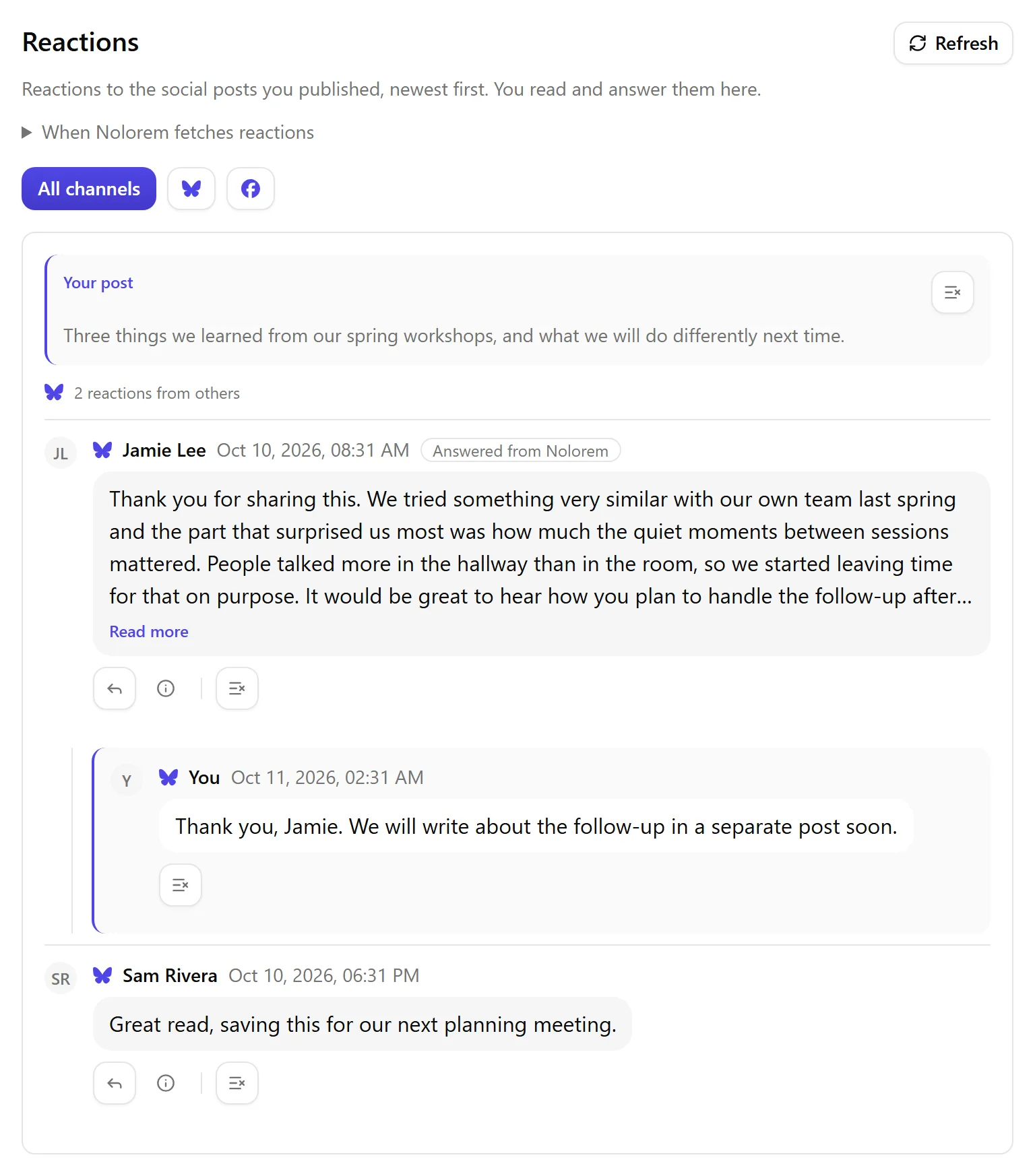
- Under the reaction, press the reply icon (the curved arrow); it reads Reply to followed by the writer's name. The answer field opens empty.
- Write your answer, or press Suggest an answer. Nolorem writes a proposal in your Voice DNA, in the language of the reaction, and puts it in the field. You can ask for up to five proposals per reaction per day.
- Read the text and change what you like.
- Press Send. Nothing is sent until you do.
Changed your mind? Press Cancel, or the Escape key, and the answer field closes without sending anything.
If another action on the same account is still running at that moment (for example a publication that is not finished yet), your answer cannot start: the page says the account is busy, nothing was sent, and you can try again in a minute.
The answer appears on the network under the reaction, as the account that published the post.
On LinkedIn, the network currently shows some characters in an answer with a backslash in front of them, such as brackets and the @ sign. The answer field warns you when your text contains one. Your text is sent exactly as you wrote it.
How Many Answers You Can Send
Answers count against a monthly allowance: 50 on Basic, 200 on Pro and 500 on Premium. Reading reactions never counts. The answer field shows how many answers are left this month. When they are used up, it tells you the date the allowance resets, and below Premium it links to a higher plan.
LinkedIn also limits how many comments one account may post per day. For a LinkedIn reaction, the answer field shows how many of those are used today.
Like, Hide or Delete
Under each reaction sits one row of icons. First the actions that change something on the network: Like (press again to remove the like), Hide on some networks, and Delete reaction. Point at an icon to see what it does and where, for example Like on LinkedIn. Only actions the network allows are shown; when it allows none, an info icon says so. After a thin divider comes Remove from this list, which only changes the list in Nolorem (see below).
Remove From This List
Next to a reaction, Remove from this list takes it off your Reactions page. This only changes the list in Nolorem. Nothing changes on the network: the reaction stays where it is. A message appears with Undo, which is there for a moment. Removing a reaction also removes the replies you sent under it from the list. A reaction that arrives later on the same post still shows up, and on a post header you can remove all its reactions at once.
Who Can Do What
Administrators and editors can read, answer, refresh and moderate reactions. Contributors can read them, but answering, refreshing and moderating stays with an editor or administrator.
Related articles
Was this article helpful?
Still need help?
Can't find what you're looking for? Open your support portal for live chat and tickets. Sign in with your Nolorem account.
Open support portal