Using AI to Generate Social Content
Create platform-optimized social posts with AI, choose content types, and generate multiple variations from a single topic.
Updated Sep 17, 2026
Nolorem's AI generates social content tailored to each platform's conventions, character limits, and audience expectations. Combined with your Voice DNA profile, every post sounds like you wrote it.
Starting a Generation
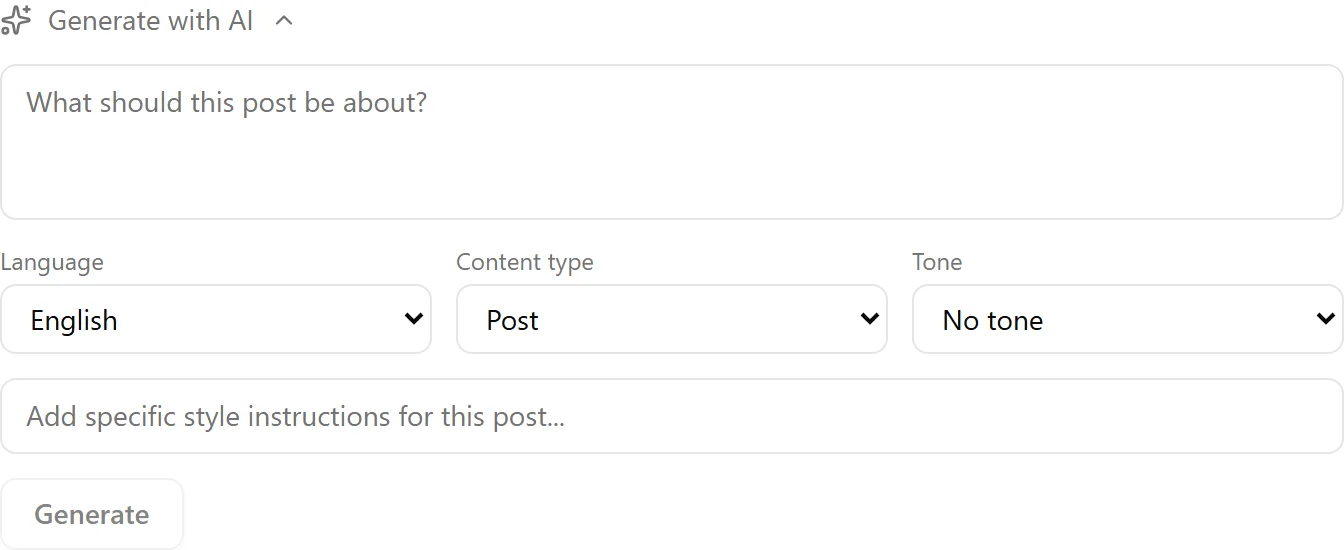
Navigate to the Social section and click Create. You will see the AI generation form with these options:
- Topic or source: type a topic, paste a URL, or select from your ideas list
- Content type: choose how the post is structured (see below)
- Channels: select which connected channels this post targets
- Language: pick the output language
Content Types
Each content type produces a different style of post:
- Post: general engaging content, suitable for most situations
- Insight: a single strong observation or lesson learned
- Hot Take: a bold or contrarian opinion designed to spark discussion
- Question: a thoughtful question that invites responses and engagement
- Story: a brief narrative arc with a situation, challenge, and resolution
- Curated News: a summary of a news source with your professional perspective added
- Educational: a how-to or explainer with actionable takeaways
Platform Adaptation
When you select multiple channels, the AI generates a separate version for each platform. LinkedIn posts are more detailed and professional, X posts are concise, Bluesky posts respect its 300-character limit, and so on. Hashtag counts are adjusted per platform too.
What the Character Counter Counts
The counter under each writing box shows what the post will really be once it goes out, not just the text you typed. It adds the hashtags you picked, because those are appended to the post at save time, and it adds the links that will be published in the post text. A link you already typed into the text costs nothing extra, and a hashtag you already used in the text is not counted twice. When a post is repurposed from a blog article, the link back to that article counts as well, from the moment Nolorem knows the address.
Two platforms are the exception: on Pinterest a link rides in the destination field, and on Bluesky without an image it rides in the card preview, so on those the link is not part of the text and the counter leaves it out.
If the counter turns red, the post is over the platform's limit and Publish Now and Schedule stay switched off until you shorten it. The button tells you why when you hover it, and the counter above it names the number.
When a Link Does Not Fit
On LinkedIn, Facebook, Instagram, Threads and Bluesky a link that would push the post over the limit is not dropped: Nolorem puts it in the first comment instead, and the card says so before you publish, naming the link that moves. X and Pinterest have no first comment to fall back on, so there a link that does not fit is the reason the post is blocked, and shortening the text is the way out.
Generating Variations
After the first generation, you can request additional variations without starting over. This lets you compare different angles on the same topic and pick the one that works best. Each variation respects the same content type and channel targets.
Voice DNA Integration
If you have a Voice DNA profile set up, the AI uses your per-channel voice rules automatically. For example, your LinkedIn voice might be more formal while your X voice is more conversational. Set up voice profiles in Settings under Writing Style.
Repurposing Blog Content
You can also generate social posts from existing blog posts. From any published blog post, use the repurpose action. The AI extracts key points and reformats them for your selected social channels, saving you the work of manually condensing a 2,000-word article into a 280-character tweet.
When you pick a blog post to repurpose, Nolorem tells you right away whether the new post will carry a link back to that article. If it will not, you see why (the blog has no public address configured, an address was never reported, or the address has stopped working) and a link to Blog Settings so you can fix it before you publish.

Telling the AI What to Change
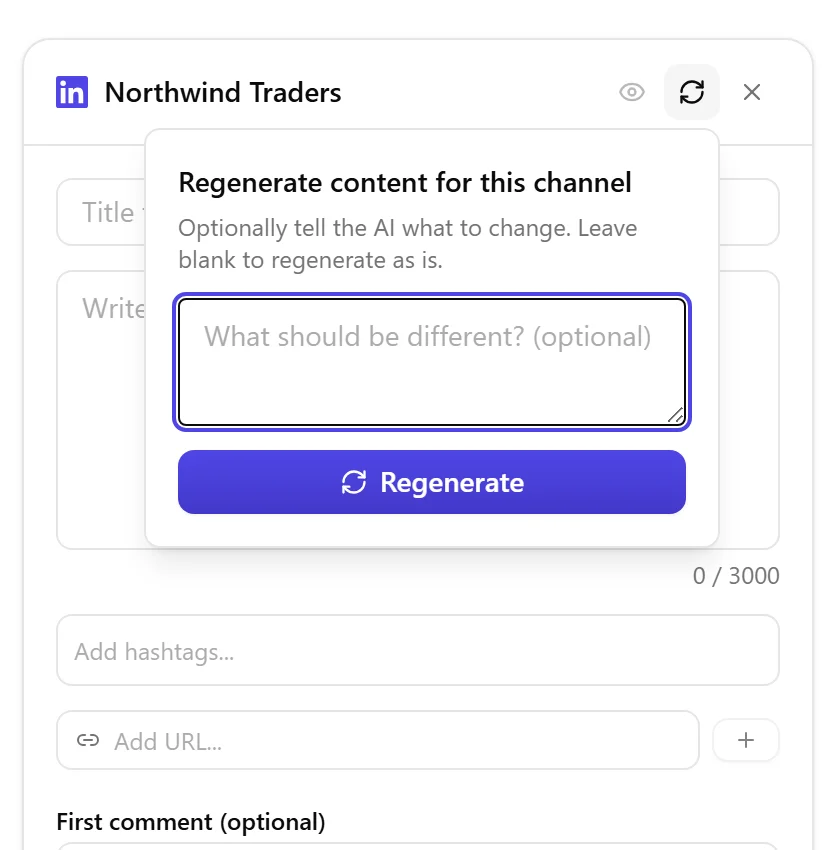
Each channel card has its own Regenerate button, in the card's header next to the preview and remove icons. Click it to open a small text field where you can describe what should be different, for example a shorter version, a different opening line, or dropping a question. Leave the field empty and click Regenerate to get a fresh take without any specific instructions, the same as before. Whatever you type stays in that field even if you uncheck and recheck the channel, so switching channels around does not lose your instructions; it only clears once you leave the page.
Publishing an Already-Published Post Again
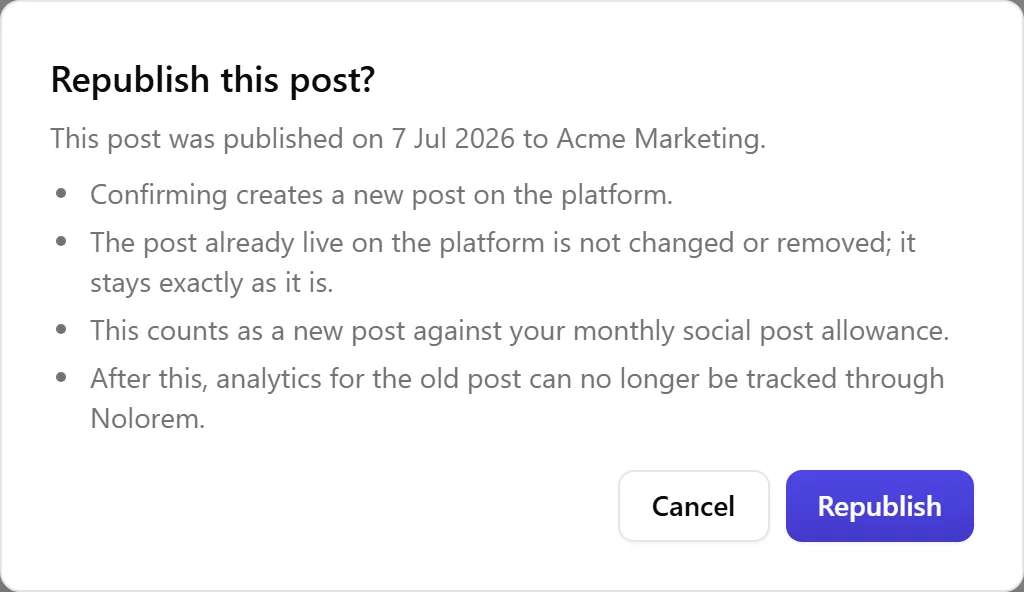
If you open a post that has already been published and click Publish Now or Schedule, the button reads Republish, and Nolorem asks you to confirm before doing anything. The dialog shows the real date the post was published and the real channel it went to, plus what confirming means: a brand-new post is created on the platform, the post that already went out is left exactly as it is (Nolorem does not touch or remove it), and the new post counts against your monthly social post allowance just like any other post you publish.
One thing worth knowing before you confirm: once you republish, Nolorem can no longer show you analytics for the old post, and if the channel was LinkedIn, you can no longer edit or delete that old post from Nolorem either. Nolorem only keeps track of the newest version from that point on.
Related articles
Frequently asked questions
Was this article helpful?
Still need help?
Can't find what you're looking for? Open your support portal for live chat and tickets. Sign in with your Nolorem account.
Open support portal