Understanding Plans and Limits
See what counts against your blog and social allowances, what happens when you reach a limit, and how the trial works.
Updated Sep 21, 2026
Nolorem offers three plan tiers, all including both blog and social tools. Your tier determines two separate monthly allowances plus your access to advanced features.
Plan Comparison
Basic (€19/month or €180/year)
For growing creators who need the essentials. 6 blog posts and 30 social posts per month. Manual voice configuration is included. AI voice analysis is not available.
Pro (€49/month or €470/year)
The full toolkit for content professionals. 30 blog posts and 100 social posts per month, AI-powered voice analysis from writing samples, priority research sources, and access to all image presets including Custom Brand.
Premium (€159/month or €1,240/year)
Built for agencies managing multiple blogs and channels at scale. 200 blog posts and 500 social posts per month, priority support, and all advanced tools unlocked. Premium is also the only paid plan that includes communication campaigns: you set a goal and a period, start from a library of ready made campaign types, and Nolorem plans, writes and schedules the blog and social content that carries it.
Two Allowances, Not One
Every plan sells two separate monthly allowances: a number of blog posts and a number of social posts. They do not transfer between each other. If you are on Basic and write only 4 blog posts this month, you still have 30 social posts to use, not 32 -- unused blog quota never becomes social quota, and unused social quota never becomes blog quota.
What counts against your blog allowance
- A blog post counts as soon as it finishes generating successfully. A post that is still generating, or one that failed, costs you nothing.
- Deleting a post does not free up the allowance -- once a post has counted, it stays counted for the month, even if you remove it afterward.
- Creating a localized (translated) version of an existing post counts once per new language. Refreshing a section that has gone stale in an existing localized version is free.
- Indexing the pages already on your own site costs no posts and does nothing to your allowance. Nolorem reads those pages so new articles can link to them, however many pages it finds; nothing it indexes ever becomes a post. See The Site Index for how this works.
What counts against your social allowance
A social post counts once it is scheduled or published. Drafts and posts waiting for review never count, however many you create or how long they sit -- only a post you actually schedule or publish spends from the allowance.
What a campaign counts against
Campaigns do not carry a content allowance of their own. A campaign plans blog posts and social posts, and every one it generates spends from the same two monthly allowances as anything else you make. A campaign that plans 12 articles spends 12 of that month's blog allowance.
The counting rules above apply unchanged, so a campaign social post set to publish automatically counts when it is scheduled, while one that waits for your review costs nothing until you schedule it yourself.
If a campaign runs into an allowance halfway through, it stops rather than quietly half-finishing. The item that hit the limit and every item still queued behind it are marked as limit reached, the campaign itself stays active, and you can generate those items yourself once the allowance resets or you move up a plan. Anything already written or published is untouched. How campaigns themselves work is covered in Communication campaigns.
The X post cap
Posts to X (Twitter) have their own separate monthly cap, on top of your social post allowance, because X charges Nolorem for every post that passes through. The cap is 15 posts on Basic, 60 on Pro, 250 on Premium, and 15 during the trial. It resets at the start of each calendar month, at the same time as your other allowances.
When you reach it, only the X channel of a post is blocked. Every other channel you selected for that post still publishes, and the post shows the X channel as blocked with the reason why. Nothing else about the post changes.
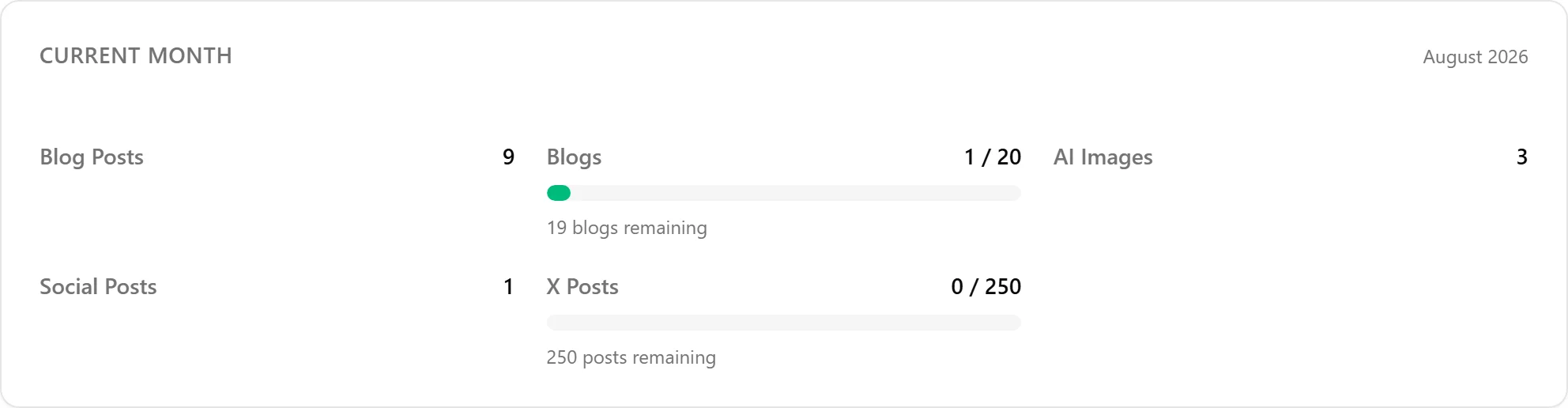
You can see how many X posts you have left in the usage card on the dashboard's Social tab.

When allowances reset
Both allowances reset on the 1st of each calendar month. Usage does not carry over, and there is no rollover for unused capacity.
What happens when you run out
When you reach a limit, the action you were trying to take is blocked, and you see a message naming which allowance is exhausted and the exact date it resets. If a higher tier exists above your current plan, the message offers to upgrade for more capacity right away. If you are already on Premium, there is nowhere higher to go -- the message tells you when your allowance resets instead of prompting an upgrade that would not help.
There is also a fair-use limit that sits above both sold allowances, well beyond what a normal month of use reaches. It exists only to catch runaway or repeated failed generation attempts, never appears as a sellable number, and stays invisible unless it is genuinely the thing that stopped you -- if it does block something, the message says so plainly.
X posts have their own separate cap, described in "The X post cap" above; reaching it blocks only the X channel of a post, never the whole post.
Usage-Based vs Static Limits
- Usage-based limits (blog posts, social posts, AI images) reset at the start of each calendar month. Your current usage is visible in Settings under Usage.
- Static limits (channels, voice profiles, blogs) are ongoing. Disconnecting a channel frees up the slot immediately.
Upgrading for Higher Limits
From Settings then Billing, click Change plan to move to a higher tier. Upgrades take effect immediately with a prorated charge. All usage-based counters keep their current values (they do not reset on upgrade).
The Trial
Every new account can start a 14-day trial. It begins when you check out on the plan you pick, not when you sign up, and no credit card is required. The trial gives you access to every feature of the platform, at trial quantities of its own -- 10 blog posts, 30 social posts and 3 videos -- not the numbers your chosen plan will carry once the trial ends. That includes campaigns, which among the paid plans only Premium carries, so the trial is the one way to try them before you subscribe. When the trial ends without a subscription, your account moves to read-only: your existing content, settings and connections all stay exactly as you left them, but you cannot create anything new until you subscribe.
The closed beta
Nolorem is also running a closed, invite-only beta, separate from the trial above. If you were approved as a beta tester, you get full access to the platform for the duration of the beta once you sign up, and afterwards you choose the plan that fits you best.
Related articles
Frequently asked questions
Was this article helpful?
Still need help?
Can't find what you're looking for? Open your support portal for live chat and tickets. Sign in with your Nolorem account.
Open support portal