Writing with Your Own Documents
Tick documents from your library on the research card and Nolorem writes with them alongside its web research, without trading one for the other.
Updated Sep 1, 2026
Nolorem researches the web for every post. If you have a document that says something the web does not, a report you commissioned, a price list, a set of figures nobody has published, you can hand it to Nolorem and it writes with that too.
You do this on the Research card when you start a post.
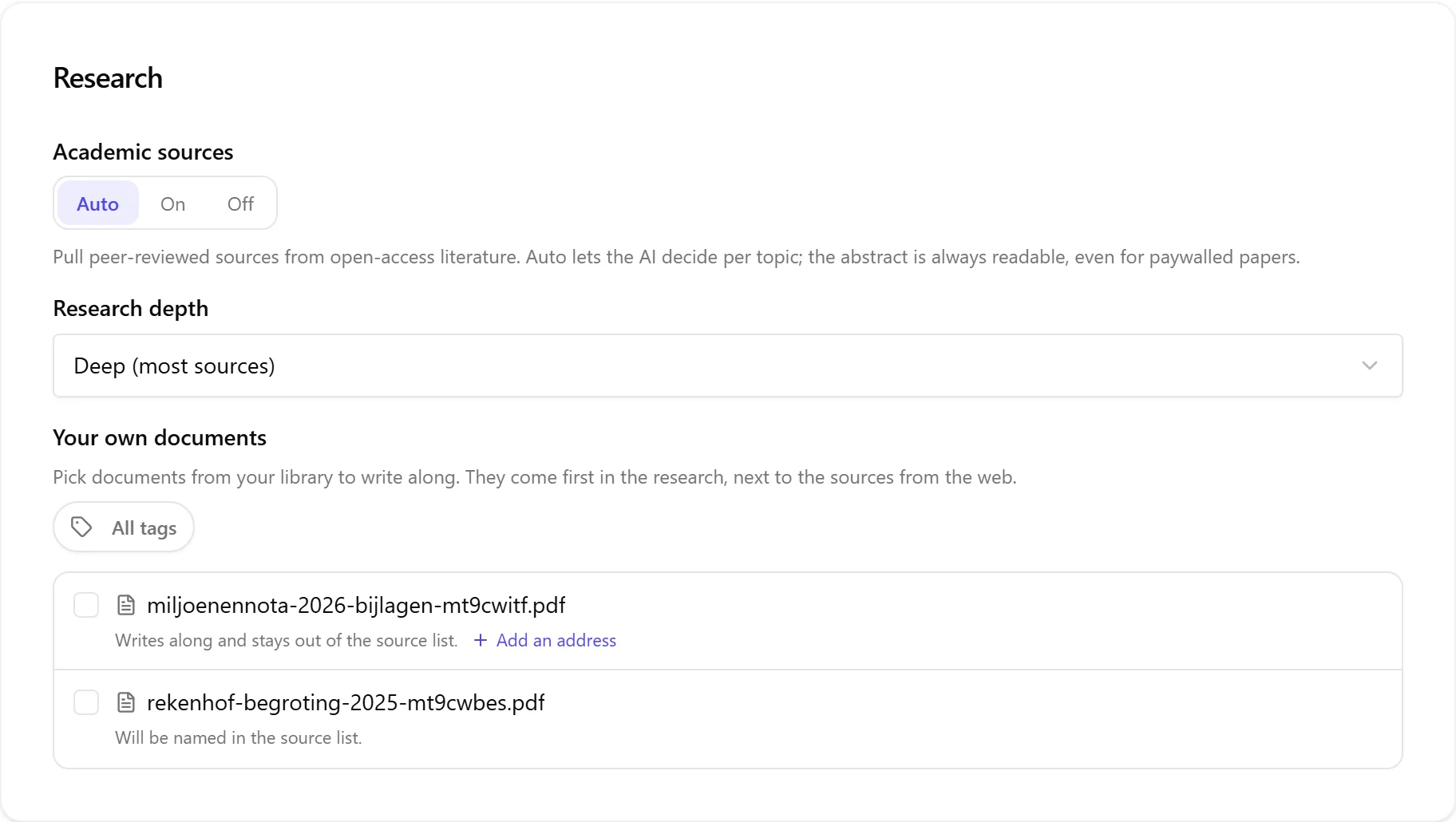
Tick the Documents, Not a Tag
You pick documents one by one. Tags are there to help you find them, not to choose for you: the tag filter narrows a long library down to the ones you want to look at, and then you tick the files.
That is deliberate. A tag names what a document is for. Choosing evidence for one particular post is a different act, and it is the one you want to be sure about, because you are the only person who knows whether this quarter's figures belong in this article.
Nothing Is Traded
Attaching a document does not cost you research. The web sources Nolorem would have found are still all there, and your documents are added on top of them, ahead of them in the writer's view because you chose them.
You never have to weigh "should I attach this, or would I rather have the extra source". Both.
The Whole Document Is Read
It does not matter how long the document is. A three page memo and a three hundred page report are both read in full, and for every section of the post Nolorem picks out the passages of your document that bear on that particular section.
So a long document does not get skimmed, and it does not flood the article with its opening pages either. Each part of the post is written against the part of your document that is actually about it.
Will This Document Be Named?
This is the one question worth answering before you tick a document, and the picker answers it for each file, in one line under its name.
"Writes along and stays out of the source list." The document has no public address. Nolorem writes with what it says, and the document never appears in the published post's list of sources. This is the normal case for something you produced yourself and have not published anywhere.
"Will be named in the source list." You have told Nolorem where this document lives on the web. It is a public page like any other source, so it is named and linked in the published post, exactly as a news article or a study would be.
You choose which of the two applies by adding a web address, or not. Every document that has no address shows a small Add an address link next to that line; use it if the document is genuinely published somewhere and you would like readers to be able to open it.
What Happens to a Document With No Address
A document with no public address still does the work. It is read, it shapes what the post says, and the fact checker treats it as a source like any other: a claim your document supports is a supported claim, not an unverifiable one.
What it does not do is appear. Not in the source list, not as a link, and not as a title in the text. Nolorem is not given the file's name at all when it writes, so it cannot mention one.
The one thing to know: if the document names itself inside its own text, and it is the kind of document a post would naturally refer to, that name can still show up in the writing the way any fact from the document can. If a document's very existence is confidential, do not rely on the writing to keep it quiet; that promise is about the source list.
A Document That Is Still Being Read
When you upload a document, Nolorem scans it and reads its text before it can be used. That takes seconds for a short file and up to about a minute for a very large one.
A document that is not ready yet shows why on its own line and cannot be ticked:
- Still processing. Come back in a moment and it will be selectable.
- No text could be read. Usually a scanned PDF that is really a picture of a page. The file is still a perfectly good document in your library; there is simply nothing in it for a writer to read.
If you start a post while a document is still processing, the post is written without it rather than failing, and Nolorem tells you which documents it had to leave out.
Arriving With a Document Already Picked
Some suggestion cards on the Create page come from a document in your library rather than from a keyword. Click one of those and you land here with that document already ticked, so you can see straight away what the post is being written from.
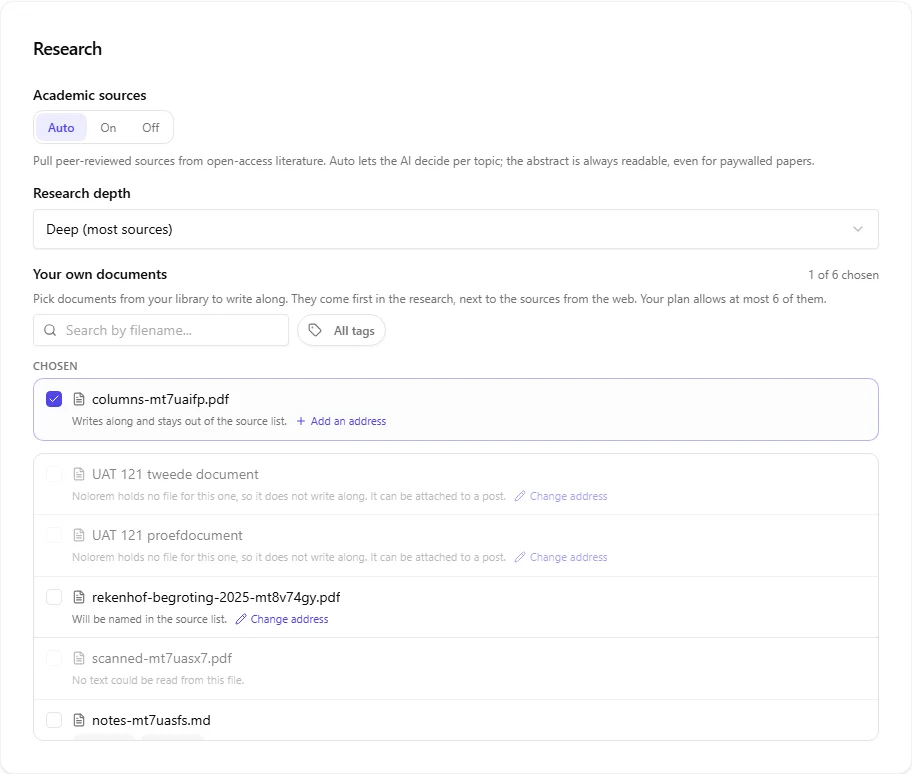
You can always untick it. The pre-tick is a starting point, not a commitment: leave it, or clear it and write the post from your web research alone. If the document is no longer usable by the time you arrive, meaning it was deleted, its scan or reading did not pass, or your plan lost the capability, Nolorem tells you why instead of quietly leaving it out.
See The Document Library for how a document ends up being suggested in the first place, and how to stop one from being proposed again.
Which Plans, and How Many
Writing with your own documents is available from Pro upwards. Storing documents is not the same thing: every plan with a document library can keep documents, and Basic can store them without writing with them.
| Plan | Write with your own documents | Documents per post |
|---|---|---|
| Trial | Yes | 2 |
| Basic | No | 0 |
| Pro | Yes | 3 |
| Premium | Yes | 6 |
The per post number is how many documents one article may draw on at once, not how many you may keep. What you may keep is a storage size, and it is described in The Document Library.
Campaigns
A campaign can carry a document selection of its own, and every post the campaign generates inherits it unless that post overrides it. Set it once for the campaign rather than on every item.
Related articles
Was this article helpful?
Still need help?
Can't find what you're looking for? Open your support portal for live chat and tickets. Sign in with your Nolorem account.
Open support portal