Publishing to WordPress
Push blog posts from Nolorem to your WordPress site, manage status sync, schedule future publishing, and handle updates.
Updated Sep 21, 2026
Nolorem connects directly to your WordPress site through the REST API. You can publish, update, schedule, and unpublish posts without leaving the Nolorem editor.
Setting up the Connection
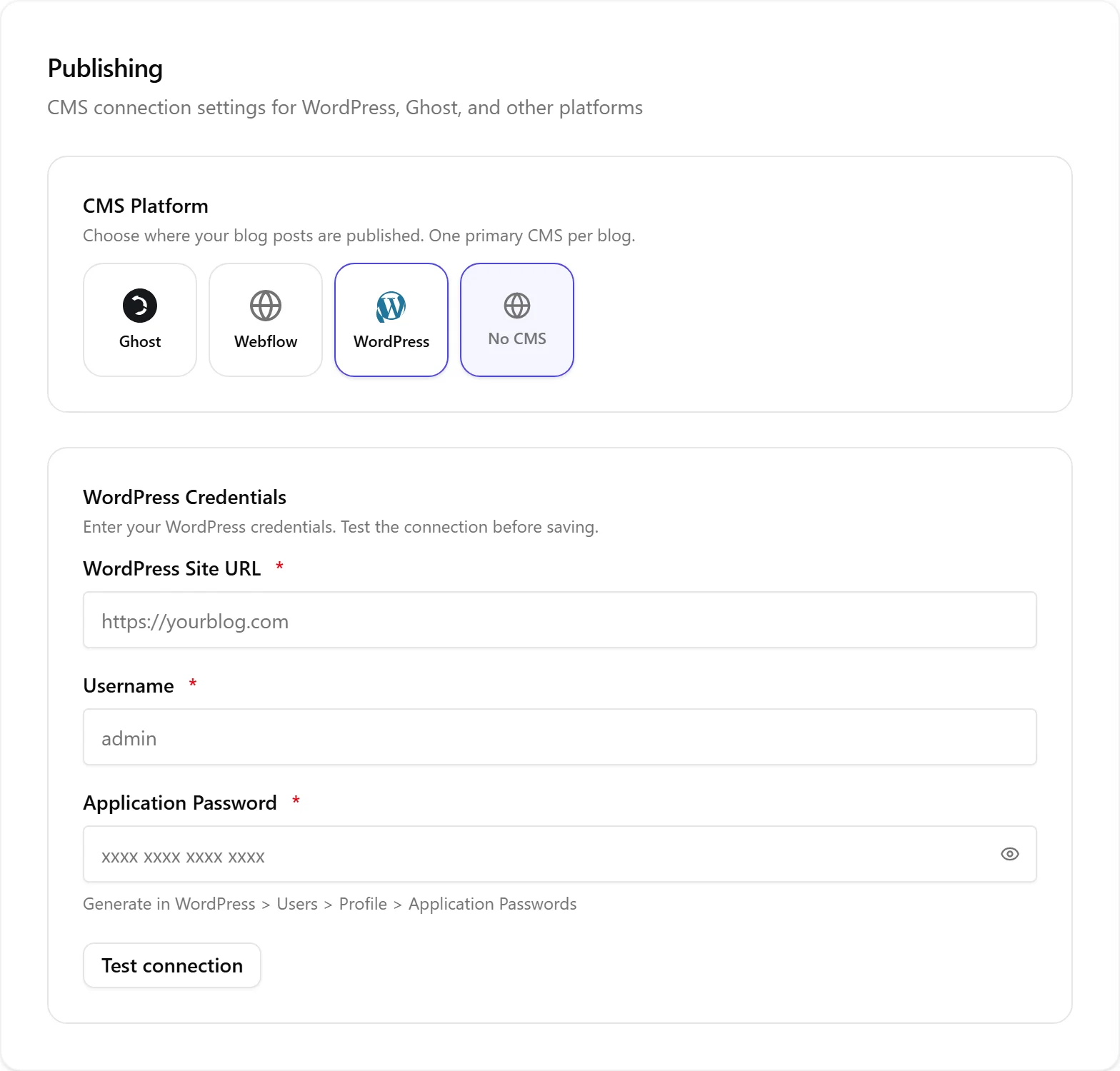
Before you can publish, connect your WordPress site in Settings under the Publishing section:
- Select WordPress as the CMS platform
- Enter your WordPress site URL
- Create an application password in WordPress (Users then Profile then Application Passwords)
- Paste the credentials into Nolorem and test the connection
- Nolorem installs a bridge plugin on your WordPress site for two-way sync
The bridge plugin enables webhook notifications so Nolorem knows when post status changes on the WordPress side. Nolorem generates a webhook secret unique to this blog and registers it with your site automatically as soon as you save your credentials; you do not configure anything on the WordPress side beyond installing the plugin. Because the secret is unique to this blog, only this blog can be connected to this WordPress site: if you try to connect a second blog to the same site, the second connection is refused, and Settings shows why.
If your WordPress connection already existed before this automatic webhook setup, the next time you save your Publishing settings, Nolorem generates and registers a webhook secret for it. This happens once; after that, saving your settings again does not generate a new secret unless you disconnect and reconnect.
Publishing a Post
In the blog post editor, click Publish. Nolorem assembles your content (sections, images, internal links, SEO metadata) and pushes it to WordPress. The post goes live immediately.
If you want to publish later, set a future date in the editor. The post enters a "scheduled" state and Nolorem pushes it at the scheduled time through a background job.
Status Sync
The bridge plugin sends webhooks to Nolorem whenever a post's status changes in WordPress. This keeps both systems in sync:
- Publishing in WordPress updates the status in Nolorem
- Unpublishing in WordPress updates the status in Nolorem
- Editing in WordPress does not overwrite your Nolorem content
Each webhook is checked against the secret registered for this exact blog, so a webhook cannot be mistaken for a different blog in your account, even one connected to a WordPress site with the same address.
Updating a Published Post
Edit the post in Nolorem and click Update. Nolorem pushes the changes to WordPress, preserving the existing URL and publication date. Internal links, images, and SEO metadata are all updated in the same push.
Unpublishing
Click Unpublish in the editor to revert a published post to draft on both Nolorem and WordPress. If the post has internal links pointing to it from other posts, those links are deactivated automatically and reactivated if you republish.
Scheduling from the Calendar
You can also schedule and reschedule posts by dragging them on the unified calendar. Dragging a scheduled post to a past date publishes it immediately. Dragging a published post to a future date unpublishes it and reschedules.
Index Your Site
Nolorem does not import your existing WordPress posts. Instead, Settings then Publishing has a Site index card that reads the pages already live on your WordPress site so new articles Nolorem writes can link to them, at no cost to your blog allowance. See The Site Index for what it shows and how to use it.
What Happens If You Switch or Disconnect WordPress?
Your posts stay in Nolorem. Switching to another CMS, or to "No CMS", never touches anything on WordPress: posts already published there stay online exactly as they are, and nothing gets deleted.
Your WordPress site address and username stay in Nolorem, in case you reconnect later. Your application password does not: you will need to generate and enter a new one if you reconnect. The webhook secret registered for this connection is cleared as well, so reconnecting sets up a fresh one.
Images and files that live on WordPress stay on WordPress. Nolorem does not copy them over. Images Nolorem generated for you are hosted by Nolorem and keep working wherever you publish next.
Internal links between your posts stop pointing at addresses that might no longer exist. When Nolorem cannot confirm where a post now lives, the link waits instead of pointing somewhere wrong, and reactivates once the destination is confirmed again.
If you want your old WordPress media on your new platform, you move it yourself. Nolorem does not do this for you.
Related articles
Frequently asked questions
Was this article helpful?
Still need help?
Can't find what you're looking for? Open your support portal for live chat and tickets. Sign in with your Nolorem account.
Open support portal